

What’s your plan when the internet disappears and the lights don’t come back on?
Cell networks are down. Internet’s gone. Nobody’s posting updates, and whatever happened last night has already overloaded the system. You don’t know if it’s a storm, a cyber issue, or something bigger — only that Google is useless and help isn’t a phone call away.
If you are prepared, then hopefully you’re not left guessing. You’ve got a tablet, e-reader, or small local server loaded with real information: how to make water safe, treat an infection, fix equipment, grow food, and keep things running without outside support. That’s what an offline knowledge hub is — a backup brain that still works when everything connected doesn’t.
If you’re prepping, living off-grid, or just trying to stay functional when systems fail, building a digital survival library is one of the most practical preps you can make. This isn’t about hoarding data or doom scrolling PDFs. It’s about having information you can actually use under pressure. This guide breaks down how to download Wikipedia and other critical resources, what tools make the setup manageable, how to store everything so it survives rough conditions, and how to keep it usable when power and time are limited. As of early 2026, file sizes have grown as content expands, but the process is still straightforward — and worth doing before you need it.
Why an Offline Library Is Worth the Effort
Internet access feels permanent right up until it isn’t. Storms take it down. Systems fail. Networks get overloaded or shut off. Sometimes you’re just far enough out that signal never mattered in the first place. When that happens, the difference between knowing and guessing gets very real, very fast.
An offline library gives you something most people don’t have when things break down: answers. Not opinions. Not social media noise. Actual reference material you can use — survival skills, medical guidance, repair instructions, food and water knowledge, and enough background to make decisions instead of reacting blindly.
here’s another problem most people don’t talk about yet: the internet itself is getting worse. Search results are increasingly recycled, AI-generated content repeating the same shallow advice over and over. Real how-to information is harder to find, buried under filler, clickbait, and rewritten copies of rewritten copies. When you lock down high-quality reference material now, you’re not just preparing for outages — you’re preserving useful knowledge before it gets drowned out.
Digital libraries beat physical books for one simple reason: density. Hundreds of books’ worth of information fits on a device that weighs less than a flashlight. Pair it with solar charging or a small battery setup and it stays usable long after the grid goes quiet.
For most people, Wikipedia is a good start. It covers almost everything at a surface-to-intermediate level and gives you context fast. But it’s not enough on its own. Real-world use means backing it up with medical manuals, field guides, repair references, and older books that focus on doing things, not talking about them.
Getting Wikipedia Offline with Kiwix
Kiwix is the gold standard tool for this. It’s free, open-source, and works on just about any device: Windows, Mac, Linux, Android, iOS. It reads ZIM files—super-compressed archives that pack Wikipedia (and tons more) into something searchable and linkable, just like the real site.
As of January 2026, the full English Wikipedia with images (wikipedia_en_all_maxi) is around 111 GB—up from about 102 GB a couple years back, thanks to more articles and better image handling. If that’s too big for your setup, grab the no-pictures version (nopic) at roughly 48 GB, or the mini edition (just intros and key facts) for about 11 GB.
Here’s how to do it step by step:
- Head to kiwix.org and download the app for your device. It’s small—under 100 MB usually.
- Go to the Kiwix library at library.kiwix.org. Search for “wikipedia_en” and pick your flavor:
- All_maxi: Full deal with pics (biggest, most useful for visual stuff like plant IDs or diagrams).
- All_nopic: Text-only, way smaller.
- Top or mini: Quick starters if storage is tight.
Recent ones include wikipedia_en_all_maxi_2025-08.zim (around 111 GB) and nopic updates from late 2025.
- Download via direct link, or better yet, use the torrent option on the site to ease the strain on servers. Tools like qBittorrent handle resumes perfectly if your connection flakes.
- Open Kiwix, point it to the ZIM file, and you’re browsing offline. It feels like Wikipedia—search, follow links, bookmark pages. Mobile versions have dark mode to save battery.
Update every 6–12 months. The English version got a big refresh in August 2025 after a long gap, so check for newer ones now.
If Kiwix isn’t your thing, there’s XOWA for more customization, but it’s clunkier.
Beyond Wikipedia: Must-Have Additions
Once you’ve got the core downloads sorted—Wikipedia via Kiwix, some solid survival manuals, maybe Project Gutenberg classics—the real work begins.
Project Gutenberg — Over 70,000 classic books, many with practical old-school knowledge. Think homesteading, basic mechanics, history.
- Kiwix has ZIM versions too. The full English collection is hefty (tens of GB), but searchable and portable.
- Download direct from gutenberg.org or use Kiwix for the offline package.
- Standouts: “Camp Life in the Woods” for trapping/shelter, old farming guides like “Ten Acres Enough.”
This isn’t about just having files; it’s about building a system that actually holds up when you’re off the grid, power is spotty, and conditions are rough. Here’s what we’ve found works best after testing setups in real scenarios, from desert heat to winter cabins.
Layer on Practical Extras
Wikipedia gives you the big picture, but for hands-on off-grid life, add these targeted resources. All available as free ZIM files or PDFs:
- WikiHow offline: Thousands of step-by-step guides with pictures—everything from building a debris hut to basic engine repair. The illustrations make it much easier than text alone.
- MDWiki: A compact medical wiki focused on symptoms, treatments, and first aid. Pairs perfectly with “Where There Is No Doctor” for remote scenarios.
- Khan Academy offline packs (via Kiwix or Kolibri): Full courses in math, basic science, physics—ideal for teaching kids, refreshing skills, or figuring out solar panel wiring calculations.
- Survival eBooks and Manuals
Aim for 200–500 GB total if you’re going all-in: Wikipedia full, Gutenberg, plus 10–20 GB of manuals.
Tools to Make It Manageable
- Kiwix — Core reader, as mentioned.
- Calibre — Free ebook manager. Converts PDFs to EPUB/MOBI for e-readers, adds tags, covers. Syncs to Kindles easily.
- wget or aria2 — Command-line downloaders for big files (great for resuming).
- Raspberry Pi — Build a mini server: Load Kiwix, attach a big SSD, share over local WiFi for family/group use.
Choose Storage You Can Trust
Standard thumb drives or basic hard drives don’t cut it for off-grid use. They fail from drops, dust, moisture, or just plain temperature swings. We’ve settled on these as the go-to options in 2026:
- LaCie Rugged SSD series (like the Rugged SSD Pro): These are built like tanks—IP67 waterproof, dust-proof, drop-resistant from several feet, and they handle extreme heat or cold. The speeds are fast enough (2,000+ MB/s) to load large ZIM files without frustration, and the reinforced casing makes them ideal for tossing in a pack or vehicle.
- SanDisk Extreme Portable SSD (V2 or Pro models): Compact, shockproof, and rated IP65 or better. We’ve dropped these, buried them in dirt, and they keep working. Great balance of price, size, and toughness—perfect for 1TB+ libraries.
- Samsung T7 Shield or Crucial X9/X10 Pro: Solid mid-range choices with military-grade drop protection. No moving parts, so vibration from trails or bumpy roads isn’t an issue.
Key rule we follow: Always SSDs over traditional spinning HDDs. No mechanical parts means far fewer ways to fail in the field. Grab at least 1–2TB to start (full Wikipedia with images is pushing 110–115GB now), and prioritize models with real-world certifications like MIL-STD-810G.
Redundancy: One Copy Is No Copy
This is non-negotiable. Drives can die from age, bad sectors, or accidents. Our standard approach:
- Make at least three copies of your entire library.
- One stays at the main homestead/base.
- One lives in your bug-out bag or vehicle.
- One gets stored in a waterproof case or Faraday pouch (for EMP protection or just extra peace of mind).
- Use different brands or models where possible to avoid the same failure mode hitting everything at once.
- Check and refresh copies every 6–12 months. Flash memory is pretty stable, but always verify files open correctly—Kiwix has quick integrity checks built in.
We’ve had a primary drive go bad after sitting in storage for a year. The redundant copy saved everything. Now we treat backups like insurance—you hope you never need them, but you’re glad they’re there.
Pair It with Reliable Battery Backups and Solar Power
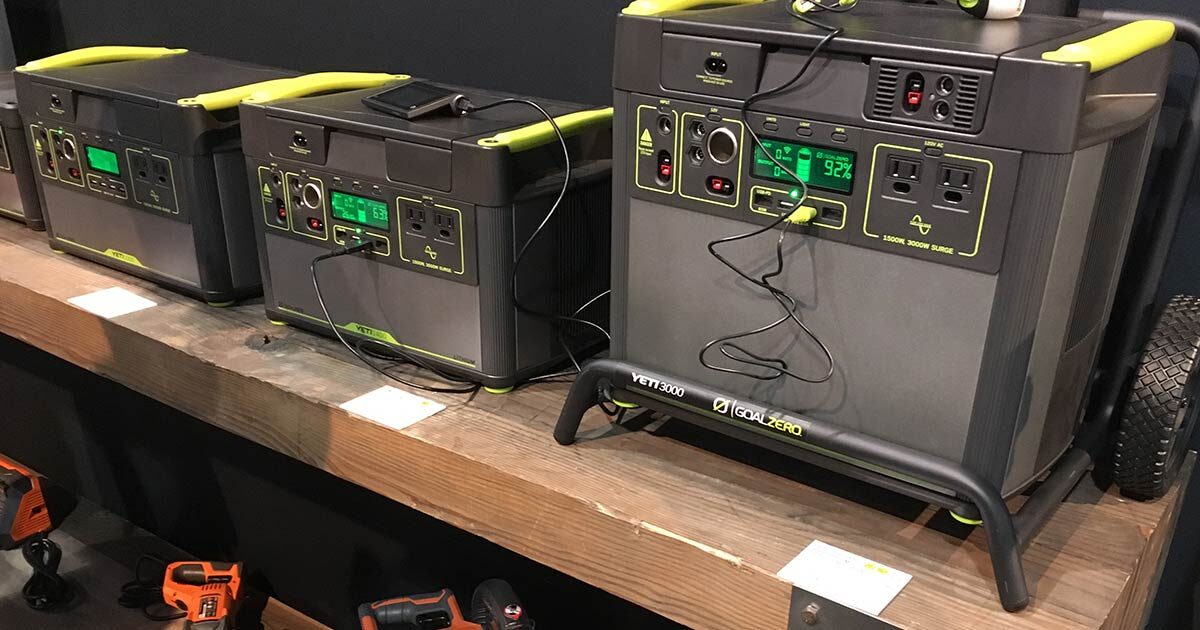
Your SSD is a good start, but without power, even the best storage is useless, so make sure you pair your library with solid battery backups and portable solar solutions. These keep your e-readers, tablets, or low-power devices (like a Raspberry Pi running Kiwix) charged for days or weeks. We’ve focused on options that are durable, efficient in variable sunlight, and practical for real-world use.
Here are some solid choices we’ve found work best in 2026:
- Goal Zero Yeti 1500X + Boulder 100 Solar Kit, 1500W Power Station One standout option we’ve come back to time and again for off-grid homesteads, RVs, or home backup is the Goal Zero Yeti 1500X + Boulder 100 Solar Kit. This combo gives you serious capacity with true portability and solar independence—perfect for keeping your offline hub running indefinitely under the sun.
- Jackery Solar Generator 1000 v2 with 200W Solar Panel One of our top picks for off-grid homesteads, RV setups, or emergency backup is the Jackery Solar Generator 1000 v2 with 200W SolarSaga Panel. The Jackery Explorer 1000 v2 packs a 1070Wh LiFePO4 battery (long-lasting with 4,000+ cycles for 10+ years of use) and delivers 1500W continuous output (with surge handling up to higher peaks). It features multiple ports: AC outlets for appliances, dual 100W USB-C for fast device charging, USB-A, and more—all in a quieter, lighter package (around 25 lbs) than older models.
Information Is a Survival Asset You Can’t Afford to Forget
This is one of those preps nobody brags about — and the people who skip it usually regret it.
When the internet is gone, power is out, and you’re cut off or far enough out that help isn’t coming, information stops being convenience and starts being capability. Knowing how to filter water, treat an infection, fix equipment, or grow food without guessing matters more than gear lists and wishful thinking. An offline library gives you that edge.
That doesn’t mean digital replaces everything. Paper still matters. Books don’t need batteries, don’t corrupt, and don’t care about EMPs or dead screens. A solid shelf of hard-copy references is still worth having, especially the kind of books that actually teach skills instead of theory. If you’re building that side of your setup, start here: https://offgridsurvival.com/bestsurvivalbooks/
Digital libraries shine where paper can’t — portability, searchability, and portability. Hundreds of books, manuals, and references in something that fits in a pocket. If you’re looking to build that side out properly, this is a good place to start: https://offgridsurvival.com/ebooksurvivalists/
The point isn’t choosing one over the other. It’s having both. When systems fail, the people who planned ahead don’t panic — they open a book, digital or paper, and get to work.